
Delivery forecasting for AI data halls

Know the date.
Defend it.

P80 covers the stretch from hall handover to live racks. It turns crews, stages, deliveries and test results into one handover date you can commit to, with its odds, rack by rack.

See pricing

Free for one hall. No card needed. Bring your own AI model.

Hall 2 · 12 MW · sample600 simulated schedules
Target
13 Nov
Chance of target
6%
Safe to commit (P80)
19 Nov
~100 GW
new data center capacity expected worldwide, 2026 to 2030
JLL Global Data Center Outlook
75%
of capacity under construction is already pre-leased
Data Center Knowledge
$2.2M
rent lost per month on a finished 12 MW hall that is not live
12,000 kW × $184 per kW per month
$510k
for every week a 12 MW hall hands over late
P80 arithmetic from the same rate

The problem

The last stretch of a build runs on spreadsheets

Building schedules stop at hall handover. Fitting out the racks, with eight trades sharing crews across hundreds of racks, is where dates slip and money is lost.

Dates are guessed

Nobody can say how likely the promised date is, so slips show up in the last two weeks, when they are hardest to recover.

Progress is a percentage

A row reported as 80% done can hide one rack waiting on power and another on a failed fiber link. The real state lives in chat groups.

Decisions leave no trace

Extra crews, overtime and late deliveries change the plan every week, but nobody records what each decision did to the date or what it cost.

Product

One date you can defend, and the facts behind it

A date with odds

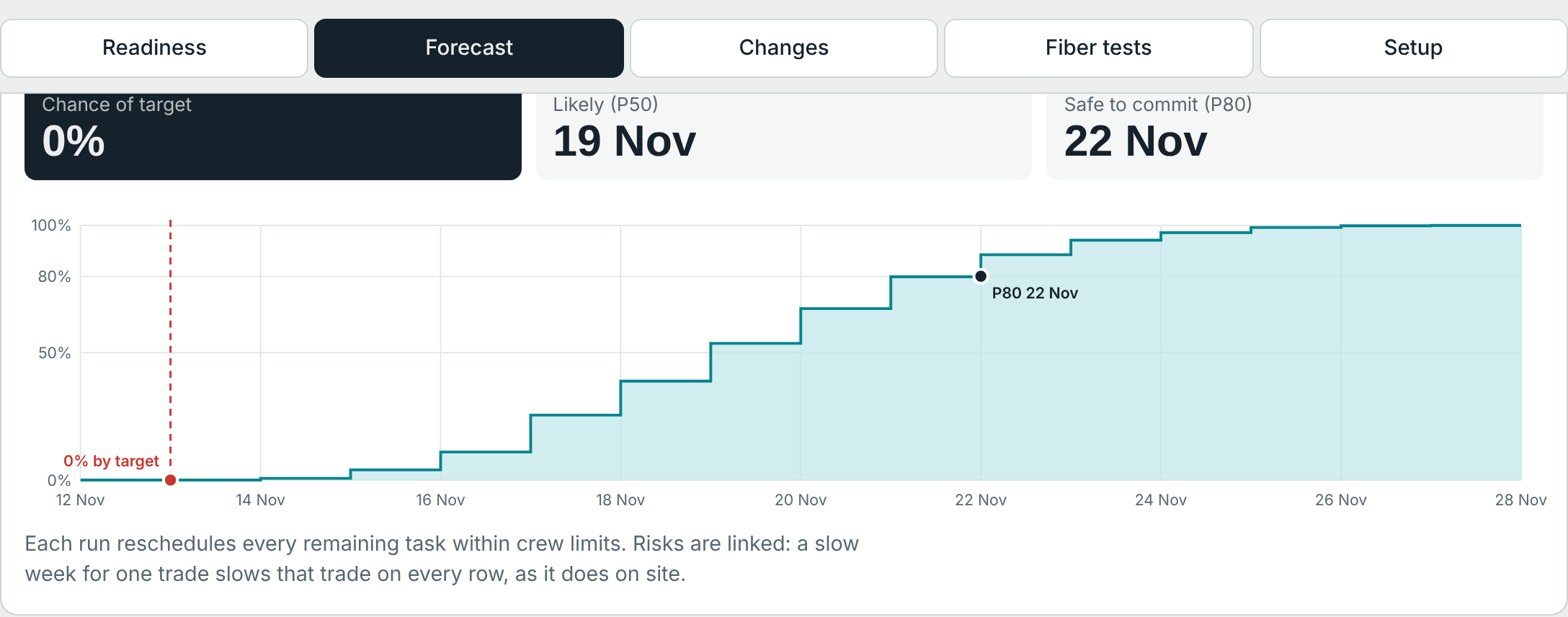
P80 reschedules the remaining work hundreds of times within your real crew limits and working calendar, with risks linked the way they are on site.

  • P50, P80 and P90 handover dates and the chance of hitting target
  • The critical chain, and which crew hand-offs set the date
  • Idle capacity after target, in MW-days and money
Forecast view: chance of target 6%, likely date 17 Nov, safe-to-commit date 19 Nov, and the probability curve
Forecast for a sample 12 MW hall

Rack-level truth

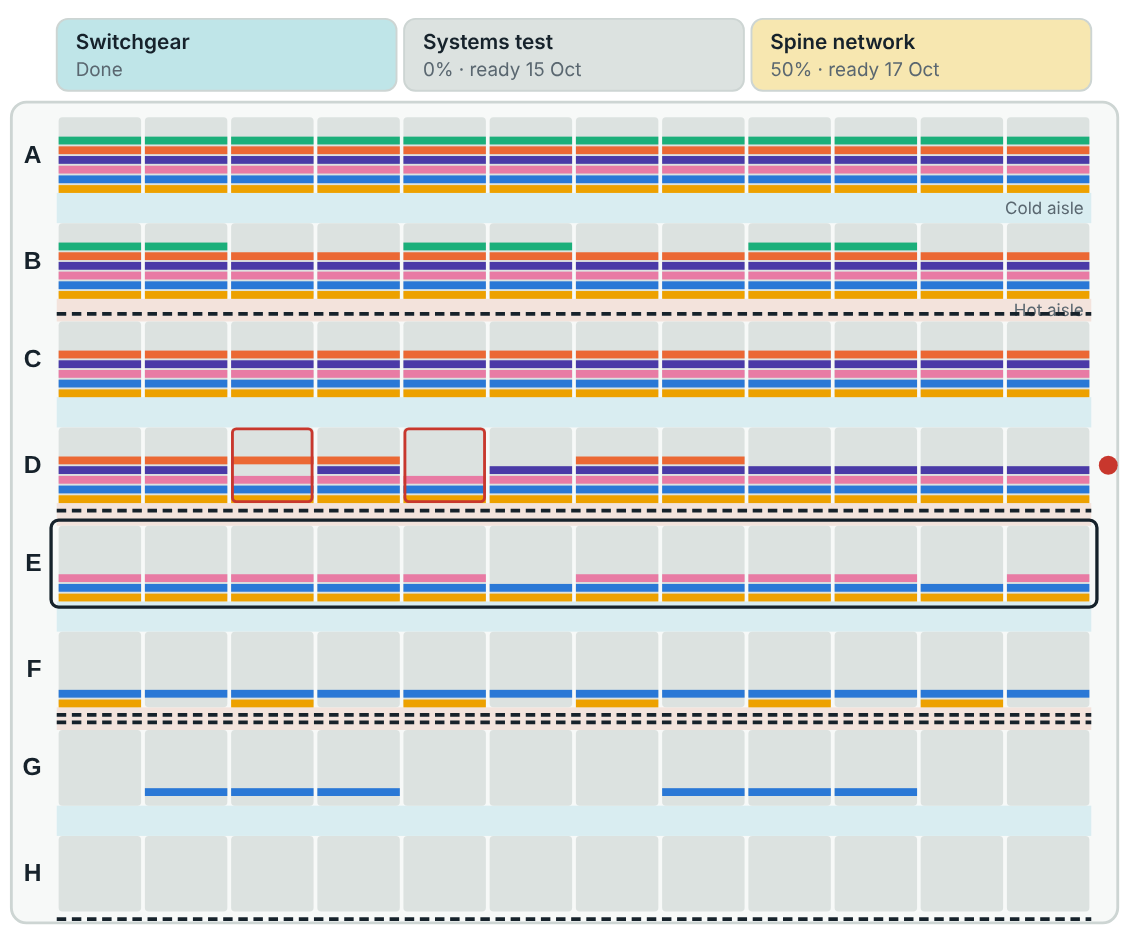
Every rack shows its build stages as colored bands, filling as work is done. Racks can be finished in any order, and the tool says what is holding each one.

  • Stage library: power, tray, fiber, test, racks, servers, liquid cooling, Cx L3, network, burn-in, handover
  • Your rack labels, from a naming pattern or your own list
  • Tap-to-update on a phone, on the hall floor
Hall floor plan with eight rows of racks, each rack drawn as colored stage bands
Hall floor: each band is one build stage

An automatic quality gate

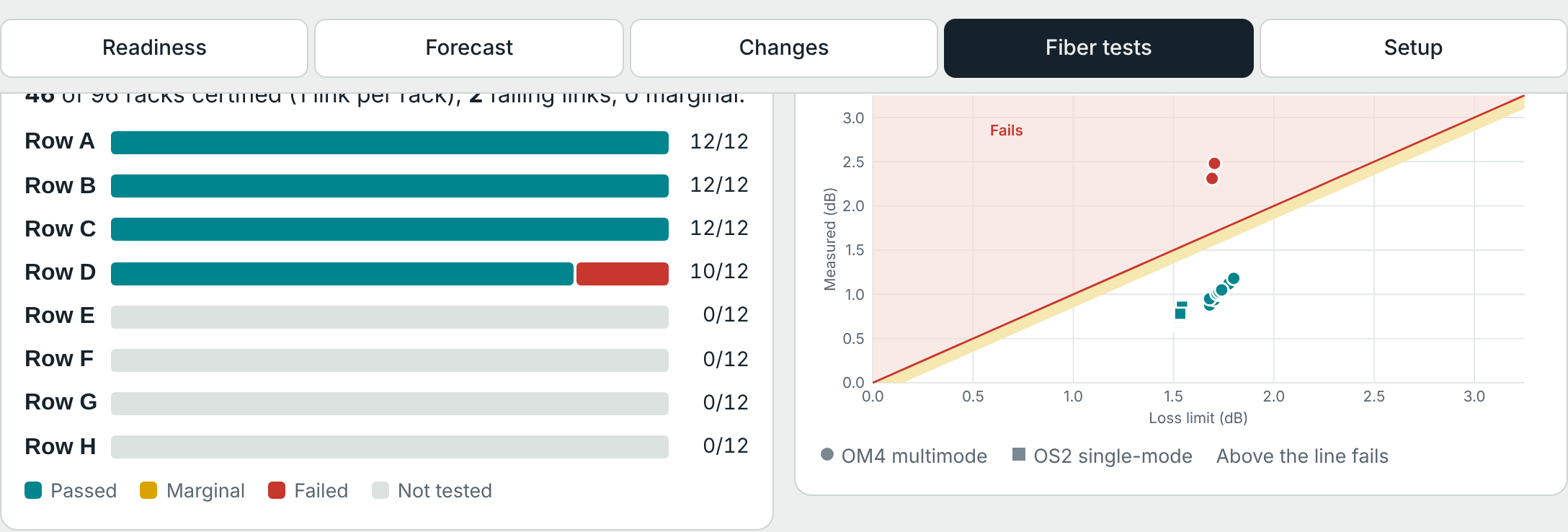
Paste the fiber tester's export. Every link is checked against its loss budget and your optics' limit, mapped to its rack, and a rack only counts once it passes.

  • Failures become punch items with owner and fix
  • Marginal links, negative readings and duplicates flagged
  • Row dates update the moment a retest passes
Fiber tests view: certification by row and measured loss against limit
Fiber certification by row

Every decision, with its effect

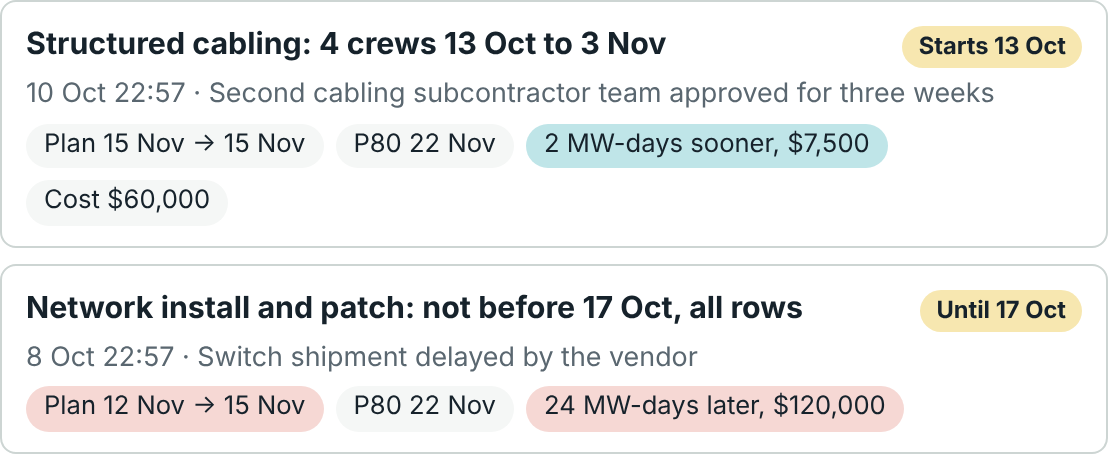
Change crews, hours, pace, delivery dates, row priority, target or scope while the job runs. P80 previews what each change does to the date and the money before you apply it, and keeps the history.

  • Crew surges and stand-downs with start and end dates
  • Overtime, weekend work and shutdowns on the site calendar
  • Cost entered against days won, so a surge that buys nothing shows it
Change history: a cabling surge that did not move the date, and a late switch delivery that pushed it three days
Change history with the effect of each decision

AI, your way

Bring the AI model you already use

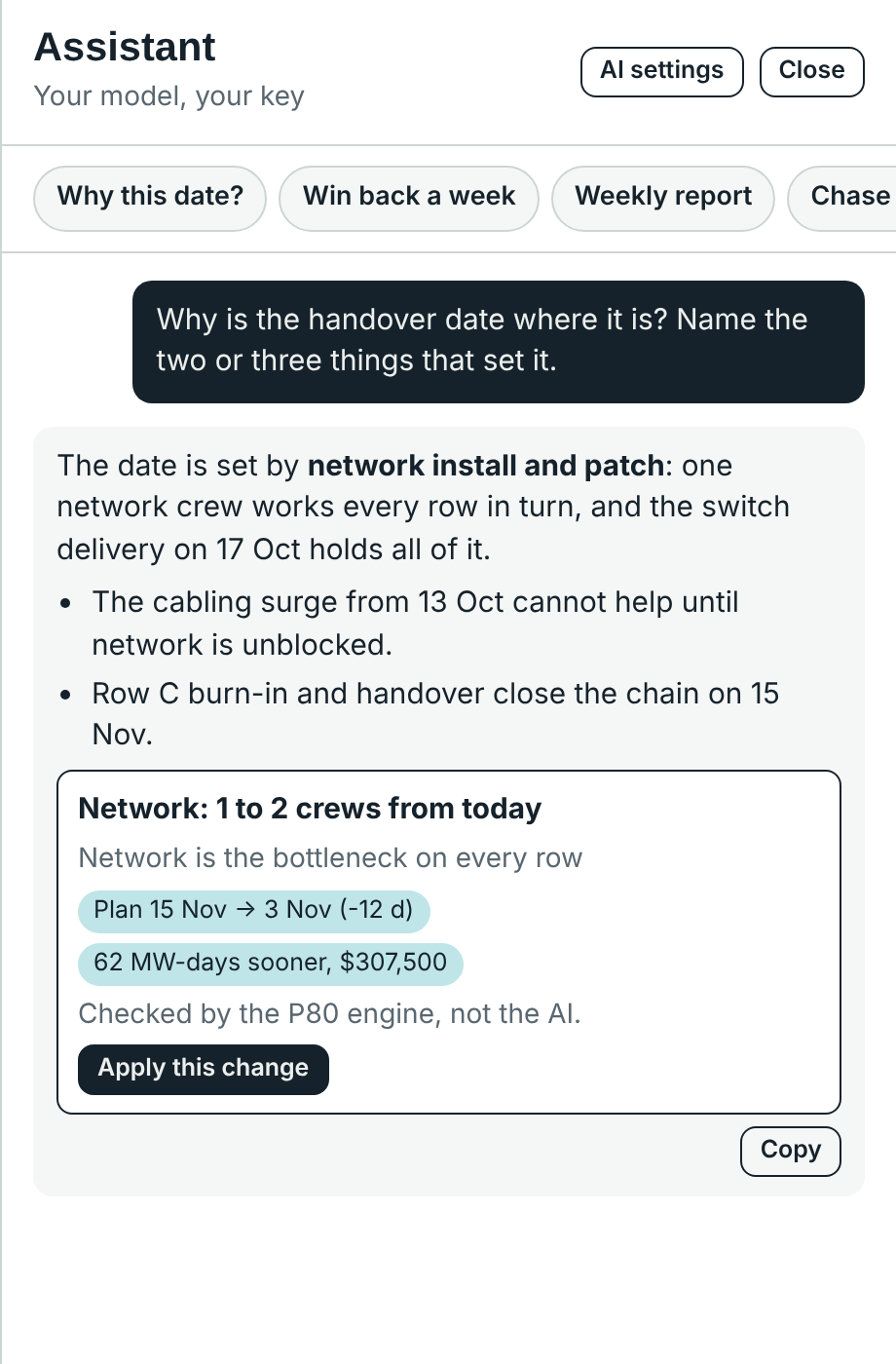
Connect the assistant to your own model with your own key. It reads the live plan and answers in the terms of your hall.

AI

The AI suggests

Ask why the date is where it is, how to win back a week, or for this week's client report.

P80

The engine checks

Every change the AI proposes is run through P80's scheduler. You see the real effect on the date and the money, not the AI's guess.

You

You decide

Nothing is applied until you press Apply. Each applied change goes into the history with its reason.

ClaudeOpenAIGoogle GeminiOpenRouter, Mistral, GroqLocal: Ollama, LM Studio, vLLM

Your API key stays in your browser and goes only to the provider you choose. P80 never sees it.

The P80 assistant explaining that network install sets the date, with a suggested change checked by the engine: 12 days earlier
A suggestion, checked by the engine

How it works

From a blank hall to a committed date in an afternoon

  1. Step 1 · 10 minutes

    Set up the hall

    A guided setup asks for rows and racks, rack labels, build stages, crews, your working week and holidays, and what a day of delay costs.

  2. Step 2 · daily

    Record progress from site

    Supervisors tap racks done on a phone and paste tester exports. The forecast updates in about a second.

  3. Step 3 · weekly

    Commit and manage change

    Commit to the P80 date, record each decision with its cost, and send the client a report you can back up.

Who it is for

Built for the people who own the date

Owners and operators

Hyperscale, colocation and sovereign AI campuses with pre-leased halls and tenant dates to meet.

GPU clouds

Fast-growing neoclouds bringing halls live with small delivery teams and no room for a slip.

Fit-out contractors

Contractors and subcontractors use P80 free on their clients' projects, and carry one way of reporting from job to job.

Pricing

Start free. Pay per megawatt while you build.

Owners pay for halls in build. Billing stops when the hall is handed over. Contractors never pay.

Free

$0forever

For a delivery lead trying P80 on one hall.

  • One hall, up to 200 racks
  • Forecast with P50, P80 and the chance of target
  • Rack-level tracking and the fiber quality gate
  • Plan changes with effect and cost
  • AI assistant with your own model and key
  • CSV export; data stays in your browser

Project

Recommended
$1,000per MW per month in build

For an owner or operator running live halls.

  • Everything in Free, with no rack limit
  • Cloud workspace: your halls on any device
  • Unlimited halls; pay only for MW in build
  • Contractors join free Roadmap
  • Weekly report pack for clients and tenants Roadmap
  • Onboarding call and priority support

Portfolio

Customannual

For campuses and programs with many halls.

  • Everything in Project
  • Portfolio view across sites Roadmap
  • Single sign-on and audit log Roadmap
  • Data residency in your region
  • Primavera P6 and Procore links Roadmap
  • A named delivery engineer
$12,000
P80 per month
$510,000
rent from bringing handover one week forward, at $184 per kW per month

Paid pilot

One live hall, 8 to 12 weeks, run with your delivery team: from $15,000, credited against your first year. We compare P80's forecast with the real handover and report it to you.

Prices in US dollars, before tax. Items marked Roadmap are planned and not yet available.

FAQ

Questions people ask first

Do I need an account?

Yes, a free one. It takes a minute and needs no card. On the Free plan your hall data stays in your browser.

Where is my data kept?

On Free, only in your browser. On Project and Portfolio, in your P80 cloud workspace, encrypted in transit and at rest, so your team sees the same hall on any device.

Which AI models work?

Claude, OpenAI and Google Gemini with your own API key, and any service with an OpenAI-compatible endpoint, including local models in Ollama, LM Studio or vLLM. You choose the model; you pay your provider directly.

Can the AI change my plan?

No. It can only suggest. P80's scheduling engine checks each suggestion and shows its effect, and you decide whether to apply it.

Does P80 replace Primavera P6 or Procore?

No. P6 holds the master plan and Procore the documents. P80 covers the rack fit-out after hall handover, where those tools stop.

How is "per MW per month" counted?

By the IT capacity of each hall in build that month. A 12 MW hall costs $12,000 a month on Project. When the hall is handed over, billing for it stops.

Does it handle our working week and holidays?

Yes: any working week, including Friday and Saturday weekends, public holidays, and reduced-hours periods such as Ramadan, plus overtime and shutdowns as dated changes.

Can we try it on a real hall first?

Yes. Use Free on your own, or take a paid pilot on one live hall and see the forecast against the real handover.

Every hall has a promised date.
Make it one you can bet on.

See pricing